Storage policies#
This document describes where our production datasets are stored, how object lifecycles are configured, and how access permissions are managed.
We are trying to strike a balance between:
Quick development iterations and unlimited ad-hoc data exploration.
Robust, reproducible pipelines, using only strictly necessary cloud resources.
This motivates two somewhat unusual principles in the design:
Quick development iterations and testing only happens on a small (but representative) subset of the data (blue highlight in the graph below). The full dataset is only accessible through code that has been reviewed and committed (green highlight in the graph below).
All outputs are versioned and immutable, except for purely temporary results (yellow highlight in the graph below). Since “production runs” of pipelines only happen after sufficient testing on subsets of the data, immutable results generally shouldn’t cause a lot of churn or resource usage.
Typical data flow#
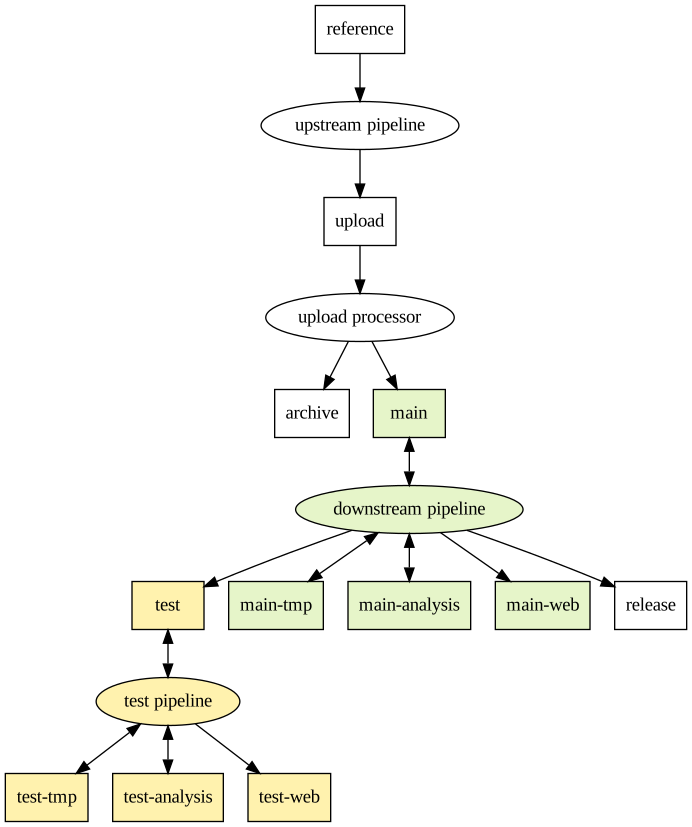
main vs test#
The above workflow of quick iteration on the test bucket with subsequent “production” runs on the main bucket works best if:
The structure of the data in the test bucket mirrors the main bucket closely (e.g. same folder organization, table schemas, etc).
The content of the data in the test bucket is a consistent subset of the main bucket. E.g. an initial joint-called MatrixTable contains 20 samples in test vs 20k samples in main.
Whenever a subsequent analysis is run, ideally the derived results should be generated in both the main and test buckets. For example, aggregate statistics for the above MatrixTable should be generated for the 20 samples in test in the same way as the 20k samples in main. This makes subsequent prototyping of pipelines much easier.
Bucket details#
In this context, a dataset corresponds to a particular project / effort, e.g.
TOB-WGS or RDNow, with separate buckets and permission groups. Below,
<dataset> is a placeholder for the name of that effort, e.g. <dataset> =
tob-wgs.
Currently, all buckets reside in the australia-southeast1 GCP region. It’s
therefore essential that all computation happens in that region too, to avoid
network egress costs.
In general, all datasets within buckets should be versioned, using a simple
major-minor naming scheme like gs://cpg-<dataset>-main/qc/v1.2/. We don’t have a
strict semantic definition to distinguish between major and minor version
increments. The addition of significant numbers of samples or the use of a
substantially different analysis method usually justifies a major version
increase.
reference: gs://cpg-common-main/references#
Description: Contains reference data that’s independent of any particular dataset, e.g. the GRCh38 human reference genome sequences used for alignment, the GENCODE GTF used for functional annotations, the version of dbSNP used to add rsIDs, etc. These resource “bundles” are versioned together. Most pipelines will depend on this bucket to some degree.
Storage: Autoclass.
Access: Everybody in the organisation has viewer permissions.
upload: gs://cpg-<dataset>-{main,test}-upload#
Description: Contains files uploaded from collaborators and sequencing providers, as a general staging area.
Main use case: Raw sequencing reads (e.g. CRAM files) and derived data from initial production pipelines: QC metrics including coverage results, additional outputs from variant callers (e.g. structural variants, repeat expansions, etc.), and GVCFs. After registration through the sample metadata server, uploads get moved from the upload bucket to the archive and main buckets through the upload processor. Also used for uploads from collaborators, e.g. for rare disease samples for seqr that get processed by the seqr loading pipeline.
Storage: Autoclass, but should be cleared up regularly by the upload processor.
Access: Human users get viewer permissions, to inspect the files before e.g. moving a subset of the data to the test bucket. Moving data from the main-upload bucket to the main bucket is restricted to service accounts that run workflows. Sequencing providers have admin permissions (as composite uploads in GCP need to delete temporary files), using a service account.
archive: gs://cpg-<dataset>-archive#
Description: Contains files for archival purposes, where long term storage is cheap, but retrieval is very expensive.
Main use case: Raw sequencing reads (e.g. CRAM files) and potentially GVCFs (after conversion to Hail MatrixTables).
Storage: Immediate Archive Storage, which means that both reading of data is very expensive as well as early deletion fees apply, which includes moving / renaming files.
Access: Restricted to service accounts that run workflows, to avoid accidental retrieval costs incurred by human readers.
main: gs://cpg-<dataset>-main#
Description: Contains files that are frequently accessed for analysis. Long term storage is expensive, but retrieval is cheap.
Main use case: Hail tables (e.g. merged GVCF files), SV caller outputs, transcript abundance files, etc.
Storage: Autoclass.
Access: Human users only get listing permissions, but viewer permissions are granted indirectly through the analysis runner described below. This avoids high costs through code that hasn’t been reviewed. See the test bucket below if you’re developing / prototyping a new pipeline.
test: gs://cpg-<dataset>-test#
Description: Contains test data, which usually has identical structure to what’s stored in the main bucket, but it’s only a small subset of the of the overall dataset. Long term storage is expensive, but retrieval is cheap.
Main use case: Iterate quickly on new pipelines during development. This bucket contains representative data, but given the much smaller dataset size the risk of accidental high cloud computing costs is greatly reduced.
Storage: Autoclass.
Access: Human users get admin permissions, so pipeline code doesn’t need to be reviewed before this data can be read or written.
tmp: gs://cpg-<dataset>-{main,test}-tmp#
Description: Contains files that only need to be retained temporarily during analysis or workflow execution. Retrieval is cheap, but old files get automatically deleted.
Main use case: Hail “checkpoints” that cache results while repeatedly running an analysis during development.
Storage: Standard Storage, but files that are older than 8 days get deleted automatically.
Access: Same as the corresponding main and test buckets.
analysis: gs://cpg-<dataset>-{main,test}-analysis#
Description: Contains derived results which should be human-readable, e.g. summary tables in CSV format, QC metrics, etc.
Main use case: Summary information from analyses, but also inputs for e.g. GWAS. Often, these files will be processed further to produce human-readable reports in the
webbucket.Storage: Autoclass.
Access: Same as the corresponding main and test buckets, with additional viewer permissions for humans.
web: gs://cpg-<dataset>-{main,test}-web#
Description: Contains static web content, like QC reports as HTML pages, which is served through an access-restricted web server.
Main use case: Human-readable analysis results, like reports and notebooks.
Storage: Autoclass.
Access: Same as the corresponding main and test buckets, with additional viewer permissions for humans.
Files in this bucket can be viewed easily through URLs of the form
https://main-web.populationgenomics.org.au/<dataset>/filepath/example.html, which serves the file atgs://cpg-<dataset>-main-web/filepath/example.html. Analogously, there’s atest-web.populationgenomics.org.audomain for thetest-webbucket.Access to this web server is controlled through the
<dataset>-web-access@populationgenomics.org.augroup, which grants access to all files in the bucket.Particularly when working with external collaborators, it’s often useful to grant access to a subset of files within the web bucket. This can be configured for the first level of subdirectories by adding
.accessfiles, which list one email address per line. Those email addresses are verified using Google’s OAuth log-in and must therefore be associated with a Google account.For example, adding
gs://cpg-<dataset>-main-web/some_group/.accesswill control the access for all files undergs://cpg-<dataset>-main-web/some_group/, including files in lower subdirectories, likegs://cpg-<dataset>-main-web/some_group/subdir/report.html.
release: gs://cpg-<dataset>-release#
Description: Contains data that’s shared with other researchers or is publicly available. Long term storage is expensive, but network egress costs are covered by the users who download the data.
Main use case: Aggregate results that are made publicly available or snapshots of datasets that are shared with other researchers through restricted access.
Storage: Autoclass.
Access: Human users only get viewer permissions, to reduce the risk of accidental modification / deletion of files.
Deletion#
By default, human users can’t delete objects in any bucket except for the
test buckets. This avoids accidental deletion of results and makes sure
our pipelines stay reproducible. However, it will sometimes be necessary to
delete obsolete results, mainly to reduce storage costs. The necessary permissions
are granted through the full access level.
All buckets retain one noncurrent object version for 30 days, after which noncurrent files get deleted. This allows “undelete” recovery in case of accidental deletion.
Access permissions#
Permissions are managed through IAM, using access groups.
<dataset>-access@populationgenomics.org.au: human users are added to this group to gain permissions as described above. Users should also be added to the corresponding Hail billing project, so they can see the batches launched through the analysis runner.<dataset>-release-access@populationgenomics.org.au: grants members viewer permissions to the release bucket. Only required if the releases are not public. This usually includes users outside the CPG, in which case they must use Google accounts.
Analysis runner#
To encourage reproducible workflows and code getting reviewed before it’s run on “production data”, access to the main bucket are available only through the analysis runner.
There are three distinct access levels: test, standard, and full.
test: Prototype and iterate on your pipeline using the test access level. This will give you permissions to view and create files in all the test buckets. You don’t need to get your code reviewed, but it needs to be pushed to a remote branch in the populationgenomics GitHub organization in order for the analysis runner to work. This access level also applies when using notebooks. In summary:
Access level: test
View / create: Any test bucket
GitHub: no PR, just push to remote branch
standard: Once you’re ready to run your pipeline on the main buckets, create a pull request to get your code reviewed. Once your code has been merged in the
mainbranch, run the analysis runner using the standard access level. In summary:Access level: standard
View / create: Any main or test bucket
GitHub: PR merged to
mainbranch
full: If you ever need write access to other buckets, e.g. to move data from the upload bucket or delete files in the main bucket, you can get full write / delete access to all buckets using the full access level. However, to reduce risk of accidental data loss, only request this access level if you really need it. In summary:
Access level: full
View / create / delete: anywhere
GitHub: PR merged to
mainbranch
For more detailed instructions and examples, look at the analysis runner repository.
If this causes too much friction in your daily work, please don’t work around the restrictions. Instead, reach out to the software team, so we can work on process improvements together.
Dependencies#
For operations like joint-calling, it’s often necessary to combine multiple datasets. Such dependencies are configured as part of the deployment configuration. Effectively this grants access to the test / main buckets of additional datasets, based on the access level.
Deployment#
See the cpg-infrastructure-private repository for the deployment configuration that can be used to bring up resources for a dataset.